


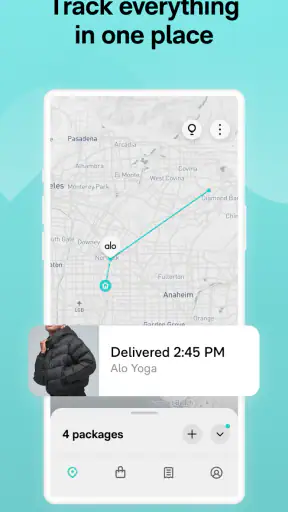
Keeping track of online orders sounds simple until several purchases are moving at once, each with a different carrier and a different delivery page. I have used Route: Package Tracker as a central place for that mess, and its main appeal is easy to understand: instead of checking Amazon, FedEx, USPS, and individual retailer pages one by one, I can look for shipment updates in one shopping-focused app.
Route is a free shopping app from Route App Inc for Android and iOS. It has been available since April 3, 2020, and the Android version reviewed here is 2.178.0, supporting devices running Android 8.0 or later. It carries a Teen content rating, has passed five million installs, and holds a 4.7 average from roughly 192 thousand ratings, with about 14 thousand written reviews. Those figures suggest that package tracking is a problem many shoppers want to solve with a dedicated tool, but popularity alone does not make it ideal for every buying habit.
How Route fits into everyday online shopping
The first thing I noticed is that Route is less about shopping for products and more about organizing the after-purchase part of shopping. Once an order exists, the useful question is usually not “where should I buy this?” but “what is happening to the package, and when should I expect it?” Route brings that question into a single place rather than leaving each shipment buried in a retailer email or carrier website.
That distinction matters. If you only order occasionally, checking a confirmation email may be enough. If you regularly buy household supplies, gifts, clothing, electronics, or other items from different stores, the separate tracking pages quickly become inconvenient. Route is most convincing when the number of orders creates its own small administrative task.
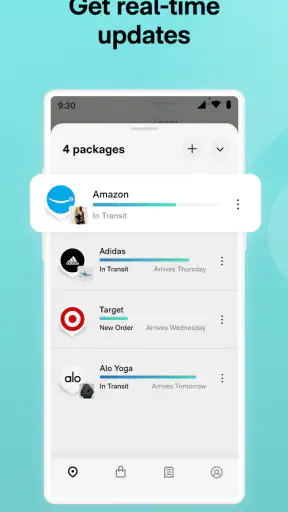
In a normal week, I might place one order through Amazon, receive a shipping notice connected with FedEx, and have another parcel handled by USPS. The old method is to open several messages, follow several tracking links, and remember which shipment belongs to which purchase. A centralized tracker reduces that mental switching. I can review the order status in one session instead of treating every parcel as a separate investigation.
The app’s store summary specifically points to Amazon, FedEx, and USPS, which makes its intended use clear: it is built around bringing familiar online orders and carrier movements together. That is more useful than a tracker designed around only one delivery company, especially for people whose shopping is spread across multiple retailers.
What the free price means in practical terms
Route is free to download and use, so the decision is not about whether the tracking convenience justifies a purchase price. There is no paid entry cost to weigh against the time saved. That makes it easy to try with a few current orders and decide whether the central view fits your routine.
Still, “free” should be judged by usefulness rather than treated as an automatic recommendation. An app can cost nothing and still be poor value if it creates duplicate notifications, requires too much manual cleanup, or adds another place to manage information. My view is that Route earns its place when it replaces repeated checking, not merely when it displays the same details I could already see in one email.
I would also avoid assuming that free access means every imaginable shopping or delivery service is covered in exactly the same way. The experience depends on the orders you place and the shipping information attached to them. For a household using several carriers, the benefit can be noticeable. For someone who buys from one retailer and already has a smooth tracking process, the gain may be small.
Where the app saves the most effort
The strongest value comes from consolidation. Rather than treating tracking numbers as isolated strings, Route gives me a place to think in terms of active orders. That is a subtle but important difference. I do not have to remember which carrier belongs to a purchase before I begin looking for it.
This is particularly helpful during busy periods when several deliveries overlap. A gift order, a replacement item, and a routine household purchase can all be moving at different speeds. A single tracker makes it easier to see which package is progressing, which one needs attention, and which one has already arrived without opening every retailer account.
Another useful habit is checking Route before contacting a seller. Delivery delays often lead people to send a support message too early, when the parcel is still moving through the network. Seeing the latest tracking state in one place can prevent unnecessary back-and-forth. It will not solve a carrier problem, but it can help me decide whether a shipment is genuinely stalled or simply between scans.
For shared households, the value is more situational. If several people order items to the same address, one person may appreciate having an overview, while another may prefer to keep purchases inside individual retailer accounts. Route is better for people who want a broad delivery picture than for anyone who considers order details strictly personal or dislikes combining shopping information.
Three workflows that make Route more useful
My first practical tip is to use it as a daily delivery dashboard rather than opening it every few minutes. Carrier scans are not continuous, so repeated refreshing rarely produces better information. A quick review once in the morning and again when you are expecting something is usually more sensible than treating the app like a live map.
Second, I find it useful to connect the tracking view with a simple household routine. If a package needs to be brought indoors promptly, checked for damage, or kept away from a shared mailbox, the centralized list helps me see what is due without searching through old emails. This is especially helpful when several parcels have similar delivery windows but different levels of urgency.
Third, I would use the app to separate “waiting” from “needs action.” A package that is still progressing does not deserve the same attention as one whose status has not changed when a delivery should already have happened. Route’s value is not only displaying movement; it is helping me decide when to stop waiting and investigate through the retailer or carrier.
That last distinction is easy to overlook. A tracker cannot make a delayed parcel arrive faster. Its practical advantage is reducing uncertainty and helping me choose the next step. If the status is current, I wait. If the information looks outdated or the expected delivery has passed, I use the appropriate seller or carrier channel rather than assuming the app itself can resolve the issue.
Where Route is less satisfying
The main limitation of any centralized tracker is that it depends on the information flowing from retailers and carriers. Route can present shipment activity, but it cannot guarantee that every scan appears immediately or that an estimated date remains accurate. A quiet tracking history may reflect a real logistics gap rather than a problem with the app.
That means I would not use Route as the sole authority for a high-stakes delivery. If I am waiting for a time-sensitive document, an expensive purchase, or an item that requires a signature, I would still check the carrier’s own tracking page when the details matter. Route is excellent as a first overview, but the original carrier remains the better place for the most direct shipment information.
There is also a trade-off between convenience and concentration. Putting many orders in one place makes them easier to review, but it also means the app becomes another account or shopping tool to maintain. Some users will see that as a fair exchange; others will prefer the privacy and simplicity of keeping everything inside retailer emails and carrier apps.
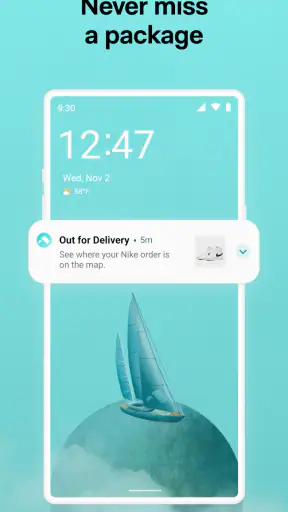
Notifications deserve a thoughtful setup as well. Delivery alerts can be useful, but too many updates can turn a helpful tracker into background noise. I would begin with the minimum alerts I actually need, then adjust after a week. The goal is to notice meaningful changes, not to receive a separate interruption for every ordinary scan.
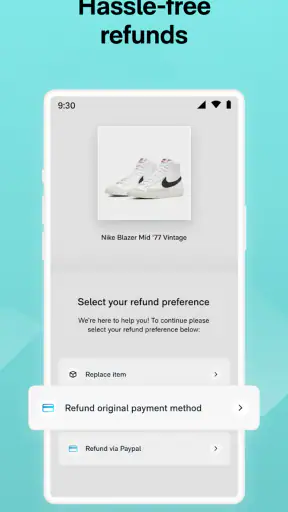
The app is also not a replacement for retailer support. If an item is missing, damaged, incorrectly addressed, or marked delivered when it is not there, the resolution normally involves the seller or delivery company. Route can help me identify the order and its last visible status, but I would not expect a tracking app to handle every dispute on my behalf.
Route compared with the usual alternatives
The most obvious alternative is doing nothing beyond keeping retailer emails. That approach is perfectly reasonable for light shoppers. It avoids installing another app and leaves order information close to the original purchase. Its weakness appears when several orders arrive together: searching email becomes slower, and it is easier to overlook an update.
Carrier-specific apps are stronger when one delivery company handles nearly everything I receive. They may be the better choice for people who need detailed carrier tools or who want the most direct relationship with one shipping network. Route is more convenient when the problem is fragmentation across Amazon, FedEx, USPS, and other order sources rather than a lack of detail from one carrier.
Retailer apps sit somewhere in between. They usually provide the best context about the purchase itself, such as the product, seller, order total, or return process. Route’s advantage is the cross-retailer overview. In my experience, the most sensible arrangement is not necessarily choosing only one: Route can serve as the quick dashboard, while the retailer or carrier page remains the place for returns, corrections, and detailed support.
That comparison reveals the app’s real position. It is not trying to be a universal replacement for every delivery service. It is a convenience layer for people who are tired of remembering where each order originated. If you value a single glance more than deep carrier-specific controls, Route makes a stronger case.
Who will get the most value
I would recommend trying Route if you frequently order from different stores, often have several shipments in transit, or regularly lose track of which carrier is handling which package. It is also a good fit for anyone who manages deliveries for a family and wants a simple overview before deciding whether an order needs attention.
People who work from home may find the organization useful because delivery timing affects their day. Instead of checking multiple pages before a meeting or leaving the house, they can review the current order picture quickly. The same applies to anyone who needs to plan around deliveries but does not want to maintain a handwritten list of tracking numbers.
On the other hand, I would skip it if you make only a few online purchases, already rely comfortably on one carrier’s app, or dislike having shopping information gathered in a separate service. It is also not the right answer for someone seeking a complete customer-service center for refunds, missing parcels, and product returns. Those tasks still belong with the retailer or carrier involved.
Android users should note the practical compatibility point: the listed minimum is Android 8.0, so older devices may not be suitable. On supported phones, the current version is 2.178.0. That version detail matters if you are troubleshooting behavior, because app experiences can change over time and an outdated installation may not match what other users see.
The Teen rating is another small consideration for families. It does not make Route a children’s shopping app, and I would treat it as a personal delivery-management tool rather than something to hand to a young user without thinking about the shopping information involved.
My verdict on Route’s value
After using it as a delivery dashboard, I see Route as a practical free app rather than an essential tool for everyone. Its value is clearest when online shopping has become scattered across multiple retailers and carriers. In that situation, the time saved by opening one organized view can outweigh the inconvenience of adding another app to the routine.
I like the way it changes package tracking from a search task into a review task. I can look at the orders that are moving, identify the ones that deserve attention, and then go to the retailer or carrier only when necessary. That workflow is more efficient than repeatedly opening unrelated emails, especially during a week with many deliveries.
My caution is to keep expectations realistic. Route is a central place to follow shipments, not a guarantee of perfect timing and not a substitute for official support. When a delivery is important, I would confirm the details with the original carrier. When an order has a product or payment problem, I would contact the retailer. Used that way, the app complements the usual alternatives instead of pretending to replace them.
My recommendation is simple: try Route if your orders are spread across several services, and skip it if your current tracking routine is already effortless. Because access is free, the best test is your own active order list. If the unified view reduces the time you spend hunting through messages, it delivers worthwhile value. If it merely repeats information you already manage easily, there is no strong reason to keep another shopping app in your routine.
For me, that makes Route a well-focused choice for frequent online shoppers who want less delivery clutter. It does not remove every uncertainty from shipping, but it gives the waiting period a clearer structure, and that is exactly where this app earns its place.


